Can't see any products in the app

Hi all, I heard about the free plugins from a friend the other day and decided to check them out, so I “bought” all the current free offerings today and made an account and all that. However, when I open the app and log in it doesn’t show any products at all. I have tried refreshing, repurchasing the plugins, and uninstalling and reinstalling the app, but nothing seems to make it work. Has anyone seen this issue before and what do I do about it?

Thanks!

On the off chance, does the dropdown in the upper left corner say “My Products”

Not sure what else to look for.

Yeah I am on that page. I also tried switching back and forth between pages on the off chance it would somehow load the products if I went off the page and back on again, but that didn’t help either sadly.

Did you find a solution to this? Exact same thing is happening to me.

Hi Rowan, are you on Mac? If so have you granted Full Disk Access to Crow Hill Install Services?

Don’t know if this will help?

I’m having the same problem on Windows 11. Also, the app will not accept my email address in the “Email Address” form box, but does work with my user ID.
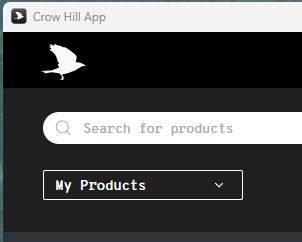
Has anyone resolved this issue. I recently signed up for a new account. I downloaded the app and ordered 2 of the free plugins but the app does not list the plugins even though the app reported that the plugins were added but remain unseen in the app. I also ran into the issue with the app not accepting my email for login purposes but finally accepting my username. I do have interest in purchasing other plugins but if I do will I be able to access them in the app?

For anyone who’s still having this issue, I managed to solve it.

It looks like there’s a bug. I think people assume that entering their username (instead of their email) and password will sign them in. I was doing the same thing.

The app is misleading because it shows a loading spinner and then takes you to “Your Account,” making it look like you’ve signed in successfully. You can test this by entering a random username and a random password—the app will still show the loading spinner and act as if you’ve signed in, even though none of your products appear.

What worked for me was changing my password (using only letters and numbers) from my account in the browser. Then I opened the app and signed in using my actual email address (this is very important) and the new, simplified password. After that, all of my products appeared.

It seems the app has trouble handling special characters in passwords, especially auto-generated ones (mine was generated by Firefox). On top of that, the app doesn’t warn you when your email or password is incorrect, which makes it seem like you’ve logged in successfully when you actually haven’t.

It would be great if the Crow Hill team could improve this behavior in the app.

Hope this helps!