Hi folks, I’ve just purchased the Crystal Piano plugin yesterday. However, for some reason the plugin won’t install via the Crow Hill App. I’ve got an up to date MAC and all of my other Crow Hill Products are working fine. About 2 seconds after trying to install Crystal Piano the message below pops up. I haven’t got a clue because my DAW was already closed and I have already granted permission for the Crow Hill App in my MAC settings. I’ve also tried rebooting my MAC and that does not work. Can any of you tech heads please advise. Thanks.
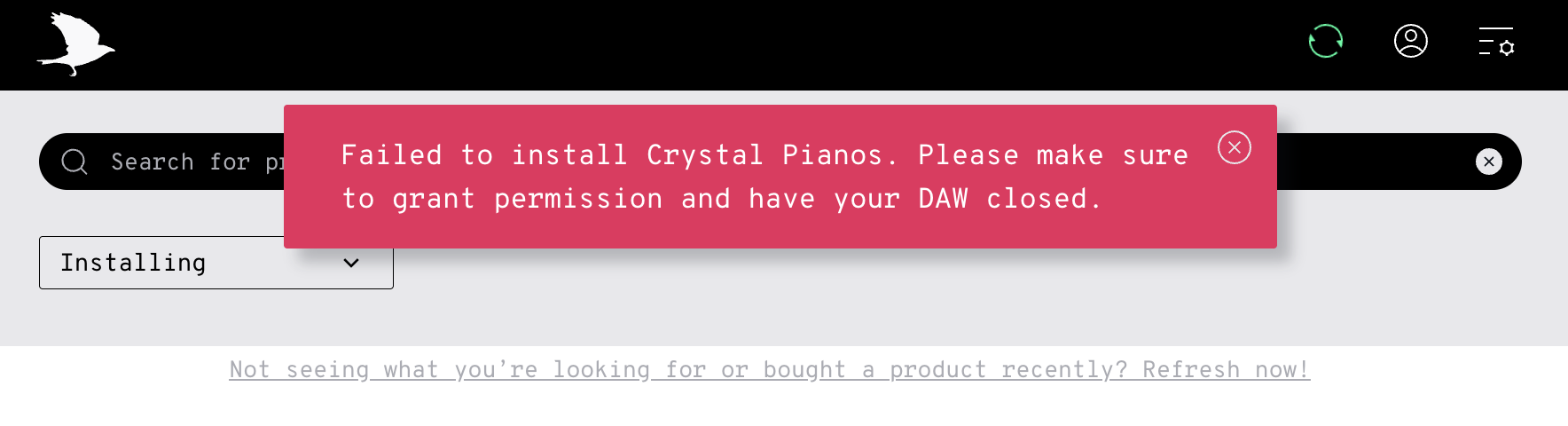
Hello Michael,
I’m not on Mac - but on Windows when I opened the Crow Hill app there was an update waiting.
Was there one also on Mac? That could maybe solve your issue if there is?
Cheers,
Eleri

Thanks for the help Eleri. Iv’e just checked for any updates in the Crowhill App and it seems like I’m already up to date. I’ve also submitted a ticket to the Crow Hill support team. Even though its still not installing much appreciated Eleri.
1 Like
Thanks for your feedback Eleri.
No worries, Michael. Hopefully the CH team can help!
1 Like
I’ve had this issue almost from Day 1 with the installer.
After hours of troubleshooting and chats with support, the best solution is for me to log in to another admin account on my computer and install the plugins that won’t install on my main account.
And then I can go back to my main account and use the plugins.
Hope this helps!
Thanks for your advice Marcus. I’m still waiting for a resolution from the Crow Hill Support team who have been in contact with me and are currently investigating the issue. If they can’t resolve the problem then your advice will most probably be my next port of call. All the. best.
You’re welcome. If they can resolve the problem, please let me know the solution.
I still have to log in to the other account to install some things (mostly the Vaults stuff).
No problem Marcus, the Crystal Pianos plugin is still not downloading on my MAC and I’m still awaiting a response from Crow Hill Support while they investigate but if and hopefully when I get it installed I will most definitely let you know and tell what I did, ok.
Hi Marcus, the Crystal Pianos plugin is now installed and working on my MAC. So, just to recap what has happened from day one of experiencing the original install failure a few days ago.
1 - I raised a service ticket with Crow Hill Support team and included the screenshot of the problem.
2 - A day later the Crow Hill Support team got in touch with me and asked me to send them a combined.log file which you can easily find in the Crow Hill App. However, before doing that I went into the Settings screen of the Crow Hill App and set the Verbose setting to on and then I tried once again to install the Crystal Pianos plugin. I set the Verbose setting to on so that information for what I am doing is stored in the combined.log file and then the Crow Hill Support team can read the data and see what’s going on in the background even though the Crystal Pianos plugin again failed to install. After doing this I turned my Verbose setting off and emailed the Crow Hill Support team a copy of my combined.log file. If you read below I have included a short excert of that emailed conversation where you can read below how to find the combined.log file.
Could you please send us your combined.log file?
To do this, please:
-
Go to Settings within the Crow Hill app, and scroll down to Verbose Logging
-
Follow the link here where it says ‘to open log’s directory…’
-
In this folder, there’s a file called combined.log
This will help us narrow it down.
3 - Today I have tried to once again to install Crystal Pianos via my Crow Hill App and it has worked. The installation process was a little slow and it did ask me to install a new installer which automatically appears part of the way through the installation and all you have to do is click ok to install it and complete the final download of Crystal Pianos. I’ve since opened my DAW which is Studio One 6 Professional and tested it out and yeah it’s working. Therefore, since you have been having this very same problem from day one with all your Crow Hill plugins it might be wise to raise another service ticket with Crow Hill Support team and copy your combined.log file and email it to them. I have no idea why Crystal Pianos installed today other than that. I hope this information helps you out, ok.
All the best Marcus.
Thanks! I’ll email them now. Everything seems to install fine for me except the Vaults stuff.  LOL. I got the logs to send through. Thanks again!
1 Like
Finally got a solution to my problem. Here’s the fix for me (thanks to Crow Hill Support):
The mystery is potentially unravelling a bit! It seems it is likely caused by a broken AU plugin installed in the user account plugin folder - not the main plugin folder.
On your main user account, could you please:
-
Right-click on Finder
-
Click on ‘go to folder’
-
Paste in: ~/Library/Audio/Plug-Ins/Components (making sure to include the little wiggly line)
-
Look to see if any plugins in here stick out that may be really old, or something you haven’t used in a long time
-
Move these files to a folder on your desktop
-
Restart your system
-
Try to enable ‘silent plugin installation’ in the Crow Hill App
-
If this works, try to install a Vaults plugin
1 Like
Thanks for letting me know Marcus,
I’ve just received this other information below off the Crowhill support team;
If you enable ‘silent plugin installation’ from the app settings menu, does it open up an admin-password prompt after a few seconds?
If so, please complete the prompt, and then try again to install.
If this doesn’t work, you should still be able to install directly from the .dmg file sitting in your downloads folder.
Just a heads up - if you use the .dmg file directly, this goes through the macOS installation process. When doing this, the option to select a custom content location isn’t quite where you’d expect it to be - it’s on the 3rd page, where you choose plugin formats. There’s a small folder dropdown menu at the top, and if you click on ‘other’ in this you can navigate to your custom location.
All the best
Thanks for letting me know Marcus,
I’ve just received this other information below off the Crowhill support team;
If you enable ‘silent plugin installation’ from the app settings menu, does it open up an admin-password prompt after a few seconds?
If so, please complete the prompt, and then try again to install.
If this doesn’t work, you should still be able to install directly from the .dmg file sitting in your downloads folder.
Just a heads up - if you use the .dmg file directly, this goes through the macOS installation process. When doing this, the option to select a custom content location isn’t quite where you’d expect it to be - it’s on the 3rd page, where you choose plugin formats. There’s a small folder dropdown menu at the top, and if you click on ‘other’ in this you can navigate to your custom location.
All the best
1 Like
HI Michael-
I’m having a similar issue with the Crystal Pianos install. I was getting the same message in the installer pretty regularly. That message no longer pops up, but the Sh$t Synth install seems to automatically uninstall Crystal Pianos and a fresh install of Crystal Pianos seems to uninstall the Sh%t Synth. I’m currently stuck in an oscillating universe of install-uninstall before I’m able to go back and make any revisions to a scene I just sent off to a director for notes. Anyone else with both plugins experienced this as well? Did you have any luck? I’m on Mac. Wondering if it just might be the new OS not playing nicely with the Crow Hill App.
Sorry to hear about your issue Kevin. The Crystal Pianos download issue that I had on my MAC is now resolved. Please refer to my previous comments on this install failure. I wish I could help more but I only followed the advice of the Crow Hill support team. In relation to Sh$t Synth not working, I can only say that I haven’t bought it yet so I’m at a loss as to give you anymore advice other than to raise a ticket with Crow Support team. I most probably will purchase Sh$t Synth in the future but if this is causing a problem for MAC users in general which I don’t really know is the case, then I’m just gonna hold fire for a little while until the dust settles. As you know it can be quite stressful and time wasting. Most of my Crow Hill products on my MAC have installed successfully first time around, however when you get these little glitches it can cause massive headaches. The support team were quick to try and help me so I’m sure they will do the same for you Kevin. Please let me know how you get on if you eventually get the SH4t Synth and Crystal Pianos uninstall and install problem resolved. It would be good to know in the future in case it happens to me or any of the other Crow Hill customers on this forum. All the best.