I am Shrikant from India. I joined the group today, I have become a big fan of the Decent Sampler. Just cant believe the treasure trove I stumbled upon. Came across a samples pack titled The Story Teller. I am floored by the fabulous samples it has. Unfortunately there is no tutorial/video explaining how to use it in DS (Reaper). The sub menu shows that most of the samples have been loaded with the “OK” tag. Few show “error” message telling me it may take time to load. But I am not able to go beyond the one sample in each of the four categories. I would like to use more and more of these samples. There is only one video clip on you tube which does not explain how the sub menu has to be accessed successfully. Samples played in the video were very good . Can anyone help/guide about how to go about in accessing more than the one sample I am getting opened now ? Thanks
Hi Shrikant - I think I found the Youtube video you mentioned - this was the only reference I could find to “The Story Teller” and “Decent Sampler”. The creator of the video (and implicitly, the pack) included a contact email address in the description for that video; it might be simplest to ask them for help.
Thanks for the response. I thought of contacting the person. S/He has not responded to the two comments posted till now. One is made one year ago and the other one is about four months old. I thought I will try my luck here with so many active users. I will try to contact him/her after some time if I fail to get any help here. Thanks.
My curiosity got the better of me; I downloaded a copy of “The Story Teller” pack (which took a while, it’s about 4GB) - it loaded on my machine without any error messages. If you are getting error messages when opening the pack, it suggests that your copy is missing some samples (or the samples are not where the .dspreset file expects to find them), or that something else is wrong.
I agree that the UI is a bit confusing. Looking at the code, the two columns of sliders on the right control the volume of different layers of samples on the notes marked yellow on the keyboard (A-1 to D1). “Menu” in the upper left selects different combinations of layers on the dark grey notes (E1 to E6). (screenshot below)
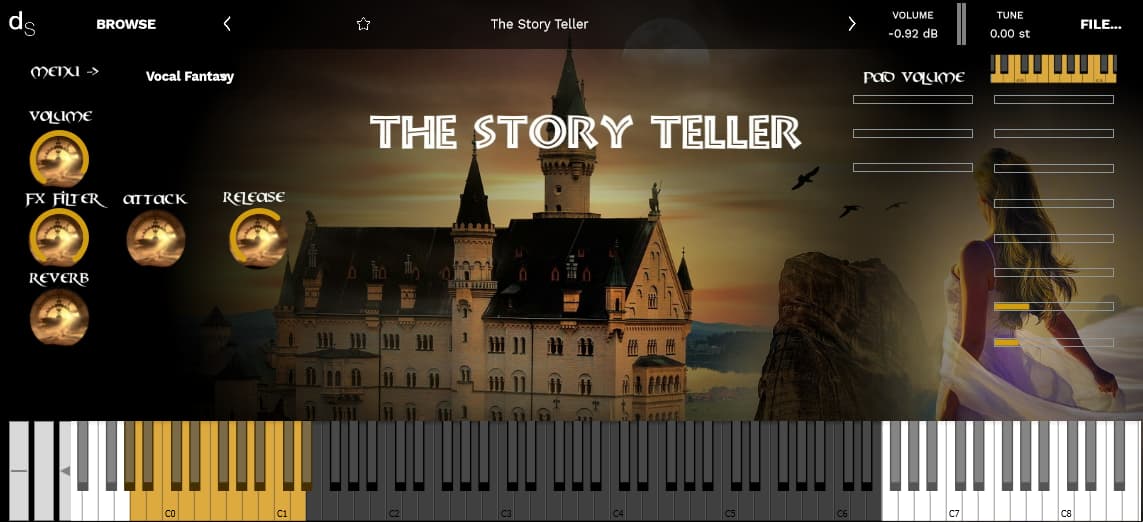
I got a reply from Martin the creator of the sample pack. He replied “Hi Shrikant
There’s a drop down menu on the top right of the UI.
Also you have to mix the various sounds on the right side volume controls.
I hope this helps, have fun!
Kind regards,
Martin
I went into the folder and checked all the wav files stored. They all play properly in Windows media player. Only some of them are not loading on to my computer from DS. The preset loading window also shows some of them as error in loading. Could be unzipping problem or the system is overloaded. 4gb data could be little heavy. I have downloaded a lot for DS past few days. I will try few more times to unzip the files and see what happens. Thanks for your efforts and help. I will inform the creator also all these details. 